June 8, 2022

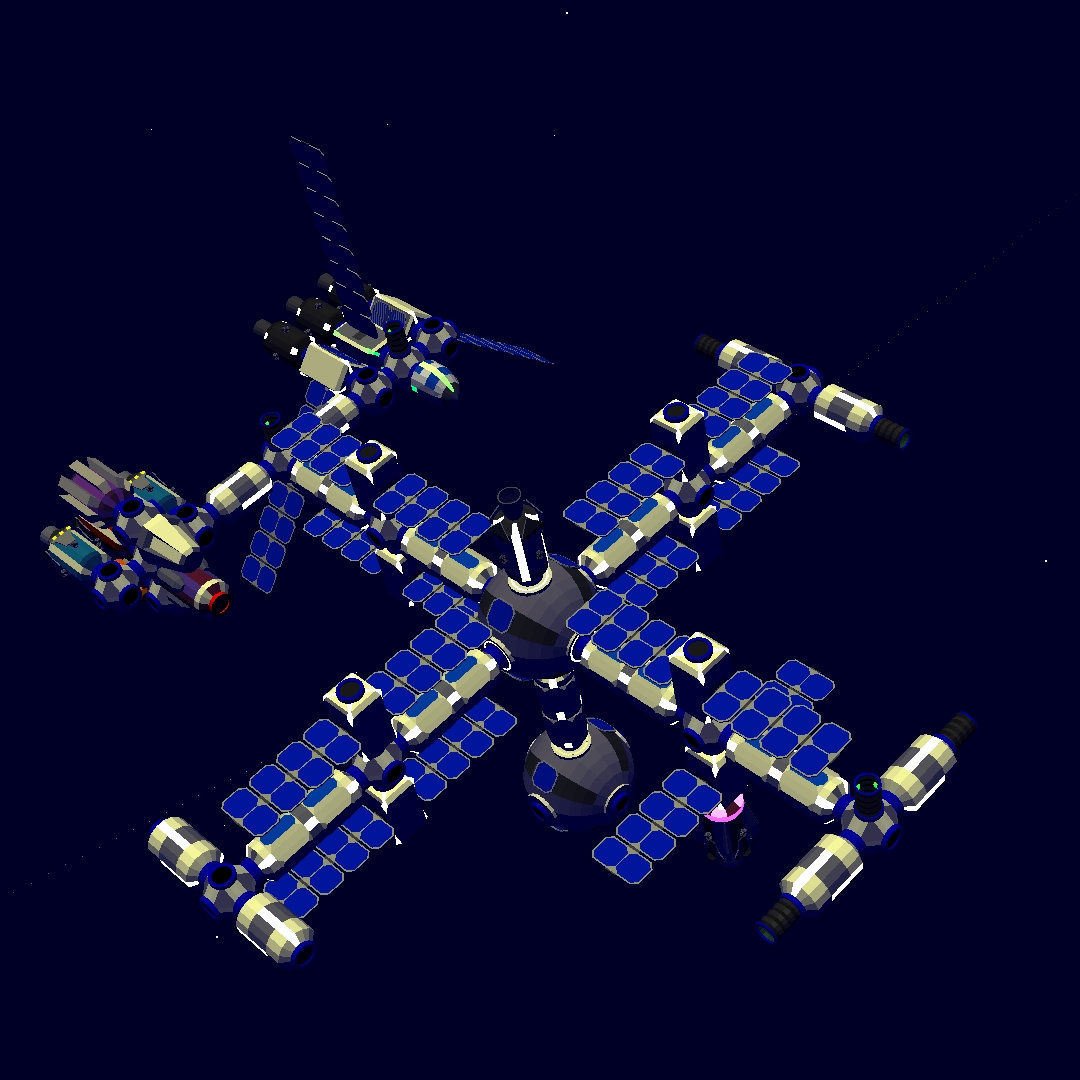
Spaceport Station

 The Spaceport Station is the main docking hub for large capital ships.  It has 8 docking ports around the large central hub.  A view dome at the top serves as the control center.

The first two ships to dock at Spaceport Station were the Genosis and Lambda Six.


They were joined by Oberon after it had finished helping to construct the jump gate network.  There is also work being done to expand to a second level.


June 1, 2022

Lambda Six

 Another Star Wars classic remade in Space Agency 2138.  This time it is the Lambda Shuttle named Lambda Six. 


The trick to getting the half solar panels is to have something blocking the way when they are powered on.  The solar panels will not fully extend when something is blocking it.  It stays that way even after the obstruction is moved.

After a brief tour of duty Lambda Six is now docked at the Spaceport Station.


May 25, 2022

TIE Fighter


This small ship has two solar panels for wings and a big viewport in the front just like the TIE Fighter from Star Wars.  It has a Black Module in the back for power.

The pilot has ejected from this ship leaving it floating abandoned above the home planet.

May 21, 2022

Home One Station

 Home One is Centauri Spaceworks main station in the Space Agency 2138 universe.  It evolved from the original Station 38.


Home One features a large solar array at the top of the station.  Below it there is a hydroponics arm with two hydroponics modules and a moisture recovery unit.  There is also a communications arm with a satellite link to the ground. 

At the bottom of the station is the jump gate.  Home One is the center of a hub and spoke system that Centauri Spaceworks has constructed.  It connects all most all the planets to the home planet.  From here astronauts on the station can connect to any other jump gate in the system.


April 25, 2020

Space Agency 2138

Space Agency 2138 has been released for Android and iOS!  This is the sequel to the original Space Agency game by Nooleus.

Big changes in game play from the previous version include:

  • 3d environments
  • Base building
  • Astronauts
  • Automatic launching and re-entry
  • No career missions
  • More resource types

First Impression

The game had a kind of zombie thriller feel when I first started playing it.  Not everything is explained in the tutorials.  I'm wandering around these space stations that came pre-made in the sand box trying to figure out how things work.  There are also containers floating around which makes it feel like some sort accident happened.  Add in the dark lighting and it can get kinda spooky.  After figuring out how things work and adjusting some of the lighting the spooky feel wore off.

My 2d piloting skills didn't provide much help in 3d.  Adding the 3rd dimension doubles the number of RCS controls.  Docking takes me much longer.  While it may appear the vehicle is lined up from one viewpoint, it may be misaligned from another direction.  I have to stop right before the docking port and re-adjust before giving the final RCS forward thrust to dock now.

The game did have more of a micro-management feel to it than the original.  Alerts pop up to let you know when a part breaks or when a supply is running low.  In some ways this keeps the game more interesting compared to the original.  In the original once you had a station built there wasn't much work do to do maintain it.  Now you have these mini-missions to that will keep coming up to complete. However it can be annoying when you are having an intense piloting session trying to dock two parts and you get a pop up that your botanist is thirsty.

Base Building

The original game was not set up to build bases on planets (even though we tried really hard to).  2138 makes base building part of the game.  The ground is divided up into a grid and you can construct different building types in the square.  You also need to build a power source and hook the buildings.  

The fact that you can customize the layout of your base opens up lots of possibilities.  I'm looking forward to seeing some creative base designs!


Astronauts


One of the most requested features in the original Space Agency game has finally arrived.  Astronauts come in four types:  commander, pilot, engineer, and botanist.  You have to choose wisely the type of astronaut you send on a mission because not every astronaut can perform every function.  

Commander is the super astronaut that can do everything.  They also cost the most to hire.  Engineers let you turn on and off power to parts.  Pilots let you control space craft.  Botanists maintain the plants in the hydroponics module.  For example, a pilot cannot turn on the gyroscopes in a vehicle.  Only an engineer or command can do that.   

Astronauts have stats that you must manage: nutrition, hydration, blood oxygen, fatigue, and radiation.  If you are not careful the astronaut could die.  Unlike the original Space Agency you need the astronauts to operate the space stations.  You can't operate something if there isn't an astronaut on board.

Player Created Universes


There are a number of smaller features that will be very exciting for players looking to create their own universes or sandboxes missions to share with others.  (Although there is not currently a share feature, this may be in a future release).

  • Ability to turn lights on and off, as well as customize the color.  Now the dark covert-ops spy station can have a different look than the science station.
  • Door locks with codes.  This opens up possibilities of having restricted areas, or preventing players from accessing entire stations or vehicles.  
  • Computer terminals with files.  Each module has a terminal that allows you to view and edit text files. This opens up more possibilities for creators to insert their content into the game instead of having to include it all in a mission briefing.  Could also be combined with the door locks to make the player go to a certain module to get the key code for another module.

Summary

This release has some major game play changes from the previous game.  Nooleus has set this up game to have lots of possible directions to expand in. I'm looking forward to future updates.

September 25, 2019

Android App Available

It is finally here!  An Android version of Station Blueprint Designer.  It is currently in beta but you can still download it and try out.


This version comes with the Centauri Spaceworks part library built in.  You can also easily share your creations to your favorite social or chat apps.

If you have any issues or questions please join the Station Blueprint Designer Discord server.

Get it on Google Play

July 20, 2019

Grasshopper Transport

The raid on Area 51 will require a massive amount of supplies for all those narrato runners.  The development of Centari Spaceworks new Grasshopper cargo transport has come at just the right time to supply them.


The Grasshopper also has a Heavy variation for additional cargo and range.


Accessing all the cargo in the Grasshopper Heavy

  1. Stage separate the tug if not already done.
  2. Dock
  3. Unload cargo.
  4. Undock.
  5. Use the thrusters on the Orion SM to start moving toward the docking port.
  6. Stage separate the Orion SM.  The vehicle should continue moving toward the docking port and re-dock.
  7. Unload cargo.
  8. Repeat.

June 21, 2019

Lunar Laser Lost Location

The space laser that Centauri Spaceworks used to etch its logo on the moon is drifting out of position!

The space laser only has rotation thrusters that adjusted the laser as it traced out the logo.  Unfortunately, all of the rotation motion ended up inducing a slight drift in the laser's position.  Without directional thrusters to correct, it was left drifting slowly away from its original position.

A mission was launched to attach an LK Core to the space laser and return it to its original position.

PSLV rocket on the launch pad


For this launch Centauri Spaceworks used the Indian PSLV rocket.  It was able to launch the LK Core playload in HOM orbit and then transfer it to an intercept course with the drifting laser platform.

Payload approaching the drifting laser platform


Once in range, the LK Core as attached to the laser plaform.  It was then used to move the laser the 99 units back to the LRC waypoint where it was originally positioned.

laser re-positioned and aimed at LUN


February 2, 2019

No Connection? No Problem!

Station Blueprint Designer is now a fully functional progressive web app.  That means that not only can you copy it to your home screen of your phone, but you can also use it offline.  This way you can design stations anywhere you go.

App open with phone in airplane mode


January 22, 2019

Quest Chaser

There is an elite crew that goes on the most dangerous daily questions in Tiny Space Program.  This is the crew of the Quest Chaser.

Almost everyday they launch from the blue pearl in the sky that is Earth to he far reaches of the solar system.  Their mission is to complete the daily quest issued by their supreme commander, Jerry, through his computer controlled minions.  They fly in their Dragon spacecraft the moons of every planet in search of crashed meteors and broken down rovers.


Each at the end of each mission they arrive back on earth with valuable metals or parts for a new outpost.

Their standard mission load out is either 6 or 9 rover parts, depending on what how generous the government is feeling with funds.   A compressed live support packages is also brought along to insure that there is enough life support to assemble the rovers, conduct the daily quest, and gather rock samples.

Photo of the Quest Chaser crew on a mission.


January 1, 2019

New Part for the New Year


Happy New Year from Centauri Spaceworks!  

To celebrate the new year, two new custom parts have been created: corridor bend left and corridor bend right.  These two parts let you offset parts with without the sharp corners for a more streamlined appearance.

The part is just slightly larger than a large station module, but narrower than the Voyager X body.  This allows it to be launched with a standard fairing.

You can access these parts by using the Centauri Part Pack for Station Designer.


December 15, 2018

Holiday Update

There is a new release of the Station Designer app.  The big feature in this release is the ability to load custom parts. This opens up possibilities for new stations designs.  Use the 120° Hub to create hexagonal stations.   Make a grappling station with the CSgtarm.  Build a refinery station with the fuel conversion plant.  The limit is your imagination!

blueprint image of 8 custom parts by Centauri Spaceworks

As a second present to everyone, Centauri Spaceworks has released a holiday part pack with two new parts:  Holiday Xmas Module and Holiday Hanukkah Module. Both parts pair nicely with the new Ion Drive part, but can be enjoyed with any of the existing parts.


Right now creating custom parts is a bit of a technical process.  However if you want to give it a try, join the Station Designer Discord.  You can find a link to the how-to there, as well as get any questions you may have answered.
Happy holidays and happy designing! 

November 13, 2018

Station Blueprint Designer Updates

The team at Centauri Spaceworks has been busy updating the Station Blueprint Designer app with new features since its initial release.

Theming


There were some tricks going on as the app got dressed in a new Halloween themed costume.

Snapping


Snapping also had a small improvement. Now snapped docking ports are indicated by a circle with a ring around it instead of just changing color. This should make it easier to identify when a docking port is snapped.

Discord Server


There is now also a Discord server if you want to share your creations, post suggestions, be a tester, etc.


New URL

The biggest news is that the app also got a new URL: https://stationdesigner.app/. The new URL and hosting service should make for better looking tweets and easier indexing on search engines.


Future Features

  • Support for running the app offline
  • Categories for parts
  • Including custom parts such as the 3-way hub and paint shop.
  • Ability for users to add their own custom parts.

October 30, 2018

Tiny Space Program Interface

Centauri Spaceworks has been branching out into the realm of Tiny Space Program.  Tiny Space program is a fun app where you can run your own space program to explore and mine other planets and moons.  You should try it out if you haven't already.

Despite being an interesting game, one of the major issues with the interface in Tiny Space Program is that it does not scale well.  Lists are often contained to a fixed space, and end up overflowing that space because they don't scroll.

Items overflowing out of a panel in Tiny Space Program

Here is a look at what the interface of Tiny Space Program could look like if some of those issues were fixed.

Proposed design with scrollable list of buildings in Tiny Space Program

One of the proposed changes is leveraging the buildings on the home screen for functionality.  In the current design, many buttons placed are around the edge of the home screen.  The center is taken up by the building view.  However, the building view only has one functional building out of six.  Let's move some of that functionality into the center of the screen where scrolling can be leveraged.  Other changes include labeling the buildings so players don't have to guess at their functionality.

Instead of opening up a small pop-up in the center of the screen, the different sections take over more of the screen with a side panel or a full screen view and enable scrolling.  Enabling scrolling allows larger items with more information, yet still allows all the items to accessible.

Compare the old market screen to the new market screen.  In the current screen you only see the icon and the count of items for all the items.  You only see the name and cost when you select an individual item. The market will be limited to 10 items before the items begin to overflow into the text area.

Current Market screen in TSP
Current Market screen

In the proposed version, you can see the name, cost, and count of all items.   A large number of items can be displayed because the list of items scrolls.  The 'Buy 1' and 'Buy Multiple' buttons do overlap the item list, however the item list can be scrolled to bring those items underneath into an unobstructed area.
Proposed design for the market screen

The VAB building also shows more information.  In the current New Mission screen, only an icon of the ship is available.  In the proposed VAB interface, the icon, name, as well as some key stats of the ship are available.
Proposed screen for ships


When selecting a ship the key stats about that ship are always visible.  The actions, astronauts, and cargo can be drilled into for more details.  In the astronaut detail view, the full name of the astronaut is available instead of just an icon.

Proposed Ship Detail screen

Tiny Space Program has a lot of potential.  It will be interesting to see how the interface develops and if Jerry, the developer, is able to address the scaling issues.

@Jerry, if you like these ideas, you are welcome to use them for my name in the credits.  Let's talk :)

October 23, 2018

Image Export in Station Blueprint Designer

Station Blueprint Designer now has the ability to export images!  This new feature allows you to save your design as an image.

To access, open the menu and choose 'Export Image'.  It will download a blueprint style image of your entire plan for you.


The export contains the full plan, even if it is too big to fit on your screen at on time.  This one is for you, mobile users.


As always, share and tweet your plans @CentauriSpace!  Happy planning.

October 4, 2018

Station Blueprint Designer Updates

Recently, all of Centauri Spaceworks resources have been dedicated to improving the Station Blueprint Designer app. There have been numerous updates posted to @CentauriSpace on Twitter.  In case you haven't been following here is a summary.

Improvements include a custom app icon if you save it to the home screen. Normally there is an option in the mobile browser menu to "Save to Home Screen" or something similar.  Very handy if you use the app frequently.  It also lets you run the app in full screen mode without the browser URL bar.


Functional improvements include cargo and power statistics for station designs.  This is in the upper right on phones and lower left on tablets and desktops.  


Thanks to everyone who pointed out that some parts were missing from the original release:  Lunar Module, Transponder, Stand-Alone Laboratory.  These have been added.

The ability to export to an image is currently in progress.  Further in the future considerations are to add the ability for custom parts.

October 1, 2018

Update 1.9.5

Nooleus had a small surprise update this past weekend.  It added the ability to backup and restore your game data.  This is very exciting for the inevitable time when you need to get a new phone. No longer do you have to worry about what will happen to all your hard work in Space Agency.

Full disclaimer, I haven't tried the restore functionality yet, but I did back up my progress.

In other Centauri Spaceworks news, the whole crew has been focusing on the Station Blueprint Designer app.  Hope to have some more blog posts on that soon.

September 6, 2018

Station Blueprint Designer App

This is a very exciting post.  Not only is it the 100th blog post, but it is also something that has been on my mind for a while: a station designer web app.

Commander Oz did a great job starting it off with the  Station Planner Kit. He traced out all of the Space Agency parts at scale so that you could move them around in Inkscape.  This worked really well if you knew how to use Inkscape and weren't trying to use it on your phone.

CptArcheron took this idea even further and made a station designer app that didn't require knowledge of Inkscape.  Anyone who had a computer and Java could use it.  But it still needed a computer.

Centauri Spaceworks! is taking the next step and making a web based app for designing stations.  Since it is web based it runs anywhere you have internet:  Android, iOS, Windows, Linux, Mac.  It is touch friendly and responsive so you can use it on the same phone or table that you play Space Agency on.

Here is a demo of the app that shows the basic usage.  It shows adding and editing a few parts as an example.


There are more features that I though about adding but haven't gotten around to yet including:

  • Export to PNG/SVG
  • Power statistics
  • Bulk selection and editing

Happy editing and launching!

Launch Station Blueprint Designer

August 2, 2018

Fuel VS Ion

The 1.9 update of Space Agency introduced a new part type.  Engines powered by electricity instead of fuel.  Centauri Spaceworks immediately began research into building an all electric ship, the Electric Scorpion.  Despite high hopes, this test was solid failure.


The Electric Scorpion was constructed and tested in the Centauri Spaceworks Workshop.  Left, right, forward and back worked well as expected.  However, the ship was unable to achieve any rotation when firing diagonally opposing engines.  Initially, it was suspected that the cause was the same mechanism that allowed ships like the Hummingbird or the Slug Transport to operate in a straight line was preventing the rotation even though their engines were offset from the center-line.

The Electric Scorpion was modified with arms that offset the ion pods from the main body.  This would move the engines even further away from the center line of the ship to increase the torque.  Unfortunately as, seen in the video below, the Electric Scorpion was not able to rotate even with the longer arms.


Without the ability to rotate itself the Electric Scorpion was not very useful as an independent vehicle.  However there was still more testing to do.

The second round of testing involved checking if the Electric Scorpion could be brought to a complete stop.  This would validate the use of ion engines for keeping a station in a fixed location.  Station keeping doesn't require much thrust, just enough to offset the occasional bump from a missed docking attempt.

The ion engines were good at bringing the Electric Scorpion to a near stop.  Unfortunately, they were not able to  precisely cancel out all of the velocity like a burst of RCS thrusters does.  There would be small amount of velocity going forwards, and a burst of the ion engines would result in a very small velocity going backwards.  While the station was visibly stationary, the navi-comp still displayed a red velocity vector indicating that the station may very slowly drift over time.

Linked ion drives are still an exciting technology, however they are not yet able to completely replace chemical fuel engines.


July 31, 2018

Station Blueprint Kit Updated

With the release of Space Agency 1.9, the blueprint kit has been updated to include the new ion drives.  As with all the parts, these new parts are compatible with Commander Oz's SVG kit as well.  The link-able ion drive has a link icon so they can be identified on station drawings. 


You can download the blueprint kit.  It is an SVG file that you can edit in Inkscape (or any other SVG editor).

There are some parts that the blueprint guide doesn't have (like fairings) because they aren't typically used in Centauir Spacework's construction.  If you need to use one of those, here is a guide for how to convert parts from the Commander Oz style to the blueprint style.

  1. Select an existing blueprint style part and copy it.
  2. Select the Commander Oz part.
  3. Ctrl-Shift-G
  4. Ctrl-Shift-+ (the plus/equal sign on the keyboard)
  5. Ctrl-Shift-V